V-Ray, Enscape, D5 or AI? SketchUp Rendering Costs Compared
V-Ray, Enscape, D5, Twinmotion and AI renderers for SketchUp compared on real 2026 prices, learning curve, hardware and when each one is worth paying for.
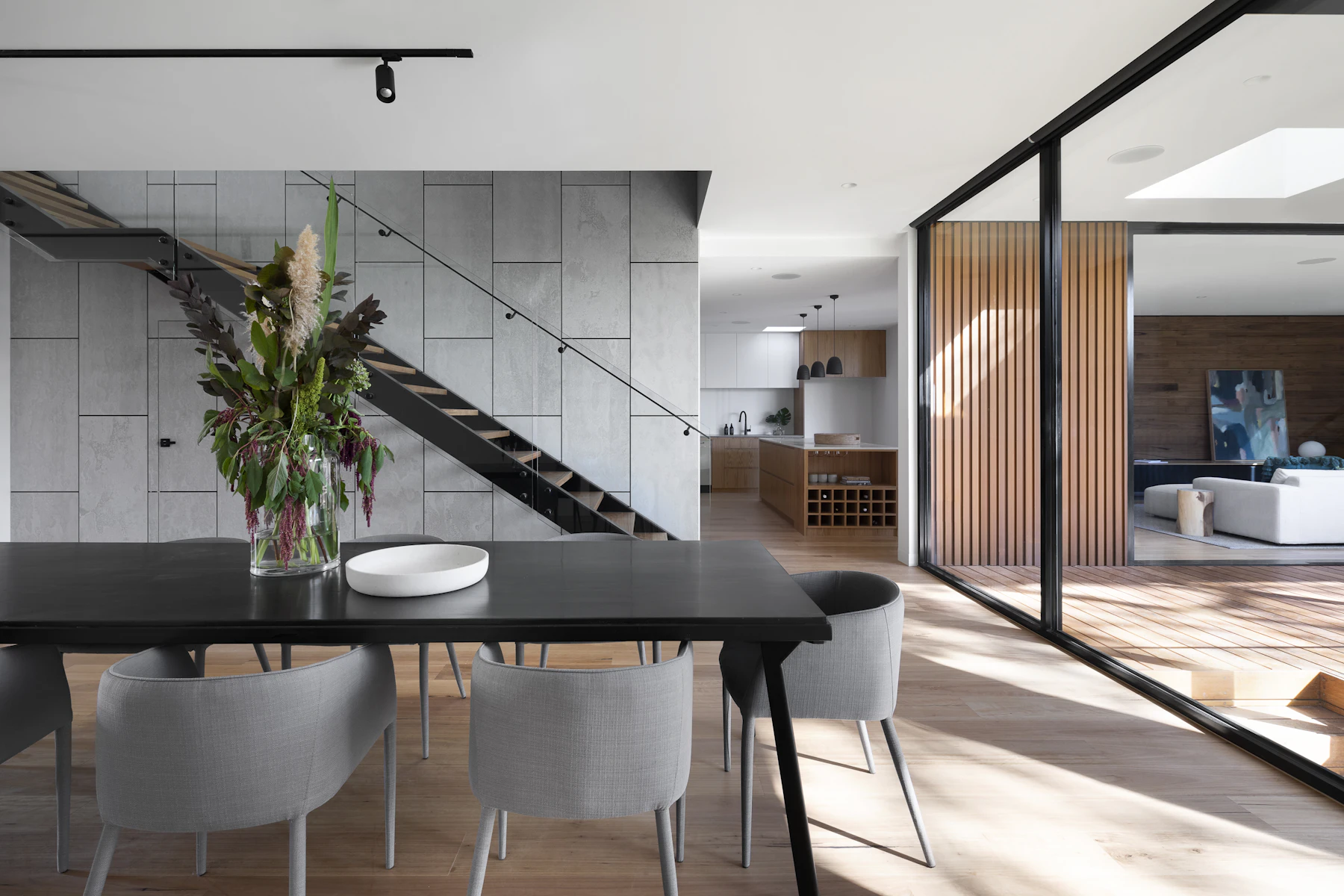
You finished the SketchUp model. The client wants to see it, not orbit around a gray box. Now you have to decide how much money, time and graphics card you’re going to throw at turning that model into a picture someone will say yes to.
The options in 2026 fall into three groups: classic production renderers (V-Ray), real-time renderers (Enscape, D5 Render, Twinmotion) and AI renderers that turn a screenshot into a photoreal image (SketchUp’s own AI Render, plus browser tools like ours). Their prices range from free to more than $1,000 a year, and they are good at very different jobs.
I’m Daniel Htut, CEO of BasedFrame. We make an AI renderer, so I have an obvious bias. I’ll tell you where AI is the wrong pick too. Every price below comes from the vendor’s own pricing page, linked inline, as of October 2026.
The short answer
- Need exact, controllable final images for a big project? V-Ray.
- Want to design and present in real time inside SketchUp? Enscape or D5.
- Small firm on a tight budget that can learn a separate app? Twinmotion, free under $1 million in revenue.
- Need a convincing concept image in minutes, from any laptop? An AI renderer.
Now the details.
SketchUp rendering options compared
| Option | Type | Published price | Best for | Watch out for |
|---|---|---|---|---|
| V-Ray Solo | Production renderer | $540 a year (billed annually) | High-control final stills | Steepest learning curve |
| Enscape | Real-time renderer | $574.80 a year ($47.90 a month, billed annually) | Live design reviews | Less fine control than V-Ray |
| D5 Pro | Real-time renderer | $360 a year, or $38 month to month | Budget real-time with a big asset library | Windows-focused |
| Twinmotion | Real-time renderer | Free under $1M revenue; $445 per seat a year above | Small firms, animations | Separate app, model sync step |
| Lumion Pro | Real-time renderer | $1,149 a year | Landscape-heavy, cinematic scenes | Highest price here |
| SketchUp AI Render | AI, built in | 150 credits a month with Pro (15 renders); add-on $11.99 a month for 1,500 credits | Quick ideas without leaving SketchUp | Few included renders |
| BasedFrame Realistic Render | AI, browser | 3 credits a render; 30 free credits, then from $49 a month for 180 | Client-ready concept images from a screenshot | Can reinterpret small details |
Prices exclude taxes and can change, so confirm on each vendor’s page before you buy.
V-Ray: the control freak’s renderer
V-Ray, from Chaos, has been the default “serious” SketchUp renderer for years. The V-Ray Solo plan is $540 a year on annual billing. V-Ray Premium is $778.80 a year and the V-Ray Collection is $1,210.80 a year. Chaos offers a 14-day money-back guarantee on those plans.
What you get for that is control. You set up lights, tweak every material, choose samplers and fine-tune exposure. If the client needs the exact oak veneer and the exact brass finish under the exact evening light, V-Ray will get you there.
What it costs beyond the license is time. Learning to light and texture a scene well takes weeks, and a single high-quality interior frame can take a long render. It shines on large projects where a few hero images justify hours of setup.
Enscape: design while you see it
Enscape, also from Chaos, renders in real time. Move a wall in SketchUp and the Enscape window updates. Chaos lists Enscape at $47.90 a month billed annually, or $574.80 a year, with the same 14-day money-back guarantee.
That live view changes how meetings go. You can sit with a client, swap a countertop and walk through the space together. The trade-off is that you get less fine control than with V-Ray, and your graphics card largely decides how smooth it feels.
D5 Render: the budget real-time pick
D5 is the cheapest paid renderer here. D5’s own pricing breakdown lists D5 Pro at $38 a month month to month, or $360 a year on annual billing. That works out to about $30 a month. D5 for Teams is $75 per seat a month or $708 a year, according to Archivinci’s 2026 pricing summary. The same D5 page notes it is Windows-focused, which matters if your office runs on Macs.
D5 also bundles a large asset library and AI features into the Pro plan, so you spend less time hunting for plants, furniture and people to drop into scenes.
Twinmotion: free if you’re small
Epic Games made a big move with Twinmotion. Its licensing page says Twinmotion is free for students, educators, hobbyists and companies earning under $1 million a year in gross revenue, including commercial use. Above that threshold it costs $445 per seat a year.
For a one- or two-person design studio, that’s hard to beat. The catch is workflow: Twinmotion is a separate application, so you bring your SketchUp model across and keep it in sync rather than rendering inside SketchUp itself.
Lumion: cinematic, at a price
Lumion Pro is $1,149 a year for a named user, or $1,499 a year for a floating seat. It’s known for landscapes, weather and animated walk-throughs. If most of your work is interiors and stills, that’s a lot to pay for features you may not use.
AI renderers: screenshot in, photo out
AI renderers skip lighting rigs and material editors. You give them a SketchUp view, often an untextured or lightly styled screenshot, plus a style or a short prompt. They return a photoreal image that follows your geometry.
SketchUp AI Render (formerly SketchUp Diffusion) is built into SketchUp. Trimble’s SketchUp AI page lists monthly credits included with your subscription: 100 for Go, 150 for Pro and 200 for Studio. Each AI Render costs 10 credits, so Pro covers 15 renders a month. The SketchUp AI add-on is $11.99 a month for 1,500 more credits, which buys about 150 more renders. The extension listing says it’s available to all SketchUp subscribers on desktop, iPad and web.
Browser AI renderers like BasedFrame work outside SketchUp. You export or screenshot a view, upload it, pick one of our design styles and render. Realistic Render is built to keep your camera, geometry and proportions as drawn while adding materials, lighting and reflections. Sketch to Render does the same from a hand sketch or line drawing. Each render costs 3 credits.
Where AI wins
- Speed to first image. No lighting setup, no material library. That’s why concept rounds and “what if it were darker walnut?” questions go quickly.
- No hardware tax. Browser tools run on remote servers, so a basic laptop works.
- Exploration. Rendering the same view in Japandi, industrial and quiet-luxury styles is three clicks, not three afternoons.
Where AI loses
- Exactness. AI can reinterpret small details: a handle shape, the number of shelves, a specific light fitting. Don’t use it for anything a contractor will price from.
- Consistency across many views. Ten renders of the same project may not match perfectly in every material.
- Model-driven animation. Real-time renderers walk a camera through your actual model. AI video tools exist, but they generate motion rather than following your geometry frame by frame.
I wrote about the same trade-off from the homeowner’s side in AI interior design vs hiring a designer. AI is great at showing options and weak at guaranteeing specifics.
What a month of rendering actually costs
Say a small studio needs about 40 client-facing interior images a month.
- V-Ray Solo: $540 a year, about $45 a month, plus the hours to set up each scene.
- D5 Pro: $360 a year, about $30 a month, plus a capable Windows GPU.
- Twinmotion: $0 if you’re under $1 million in revenue, plus the sync step and hardware.
- SketchUp AI Render: 15 included renders with Pro, plus the $11.99 add-on to cover the other 25.
- BasedFrame: 40 renders × 3 credits = 120 credits, inside the Startup plan’s 180 credits for $49 a month. Unused credits roll over. Full details are on the pricing page.
The license is rarely the biggest cost. Your hours are. An hour of setup per image adds up fast at a designer’s rate, and that’s the real reason studios mix tools.
The workflow most studios end up with
From what we see, the practical answer is “both”:
- Concept stage: AI renders from SketchUp screenshots to test styles, palettes and moods with the client, cheaply and fast.
- Design development: real-time (Enscape, D5 or Twinmotion) for live reviews once the layout settles.
- Final hero images: V-Ray or a carefully tuned real-time scene for the two or three images that go on the website or into the bid.
If you only do residential interiors and most of your images are for client buy-in, you may find stage 1 covers most of what you need. If you’re producing marketing images for a development, stage 3 still matters.
How to try an AI render on your own model
- In SketchUp, set up the camera you want and turn off shadows and section planes.
- Export a 2D view or take a clean screenshot at full screen size.
- Upload it to Realistic Render, pick a style and add a short note like “matte oak floors, linen sofa, late-afternoon sun.”
- Fix small issues with Magic Edit or change the mood with Relight instead of re-rendering everything.
- Compare it side by side with your usual render before you decide.
You can create a free account here. New accounts get 30 credits with no card, enough for 10 renders of your own models.
Sources
- Chaos, V-Ray pricing
- Chaos, product pricing including Enscape and Veras
- D5 Render, Render Pricing in 2026: D5 Plans, Costs & Is It Worth It?
- Archivinci, D5 Render Pricing 2026
- Epic Games, Twinmotion licensing and pricing
- Lumion, plans and pricing
- Trimble, SketchUp AI subscription and credits
- SketchUp Extension Warehouse, AI Render
Frequently asked questions
What is the cheapest way to render a SketchUp model?
If your business earns under $1 million a year, Twinmotion is free for commercial use, according to Epic's licensing page. SketchUp subscribers also get a small number of AI Render credits each month at no extra cost. Among paid renderers, D5 Pro is $360 a year on annual billing, below V-Ray Solo at $540 and Enscape at $574.80.
Is V-Ray better than Enscape for SketchUp?
They solve different problems. V-Ray is a production renderer you tune for final, high-control images. Enscape is a real-time renderer that updates as you model, which suits design reviews and quick client walk-throughs. Many studios use Enscape while designing and V-Ray for hero shots.
Can AI replace V-Ray or Enscape?
For early concepts, mood options and quick client previews, often yes. For construction-accurate images, exact product specs, animations driven by your model or consistent views across a large project, a traditional renderer is still the safer tool, because AI can reinterpret small details.
How many renders do SketchUp's built-in AI credits cover?
Trimble lists 150 monthly AI credits with SketchUp Pro and 200 with Studio, and AI Render costs 10 credits per image, so that is 15 or 20 renders a month. The SketchUp AI add-on is $11.99 a month for 1,500 extra credits, or about 150 more renders.
What does an AI render cost on BasedFrame?
Realistic Render and Sketch to Render cost 3 credits per image. New accounts get 30 free credits with no card, enough for 10 renders. The Startup plan is $49 a month for 180 credits, which works out to 60 renders, and credits roll over.
Do I need a powerful graphics card to render SketchUp models?
For desktop renderers like V-Ray GPU, Enscape, D5 and Twinmotion, your graphics card largely decides how fast and smooth they run, so check each vendor's system requirements before you buy. Browser-based AI renderers run on remote servers, so a basic laptop is enough to upload a screenshot.
Try it yourself
Tools from this guide
 3 creditsRealistic RenderGet client-ready SketchUp renders in under 3 minutes.Open tool →
 3 creditsSketch to RenderTurn a sketch or SketchUp view into a photoreal render.Open tool →
- 3 creditsCreative InteriorTurn sketches or clay models into styled, presentation-ready interiors.Open tool →
 1 creditRelightGolden hour, overcast or evening in one click.Open tool →
 1 creditMagic EditDescribe a change and watch it happen.Open tool →
More from Resources
Keep reading
GuidesHow to Furnish a Small Apartment with AI Before You Buy a SofaThe average new studio is 460 sq ft. Here's how to photograph your small apartment, test layouts and furniture with AI, and buy pieces that actually fit.→
GuidesBefore You Spend $3,178 on Exterior Paint: 6 Visualizers ComparedColorSnap, Behr, Hover, Hardie Designer, real samples and AI compared: how to preview your house color before a $3,178 exterior paint job.→
